Bug #3692
openExcel Import Stuck in Processing & File Not Uploading
Description
Module:
ERP → Purchase → Purchase Order → Excel Import
Background:
User should be able to import purchase order data using Excel file
Steps to Reproduce:
Go to Purchase Order
Click Excel Import
Upload valid Excel file (purchase_template.xls)
Click Upload / Process
Current Behavior:
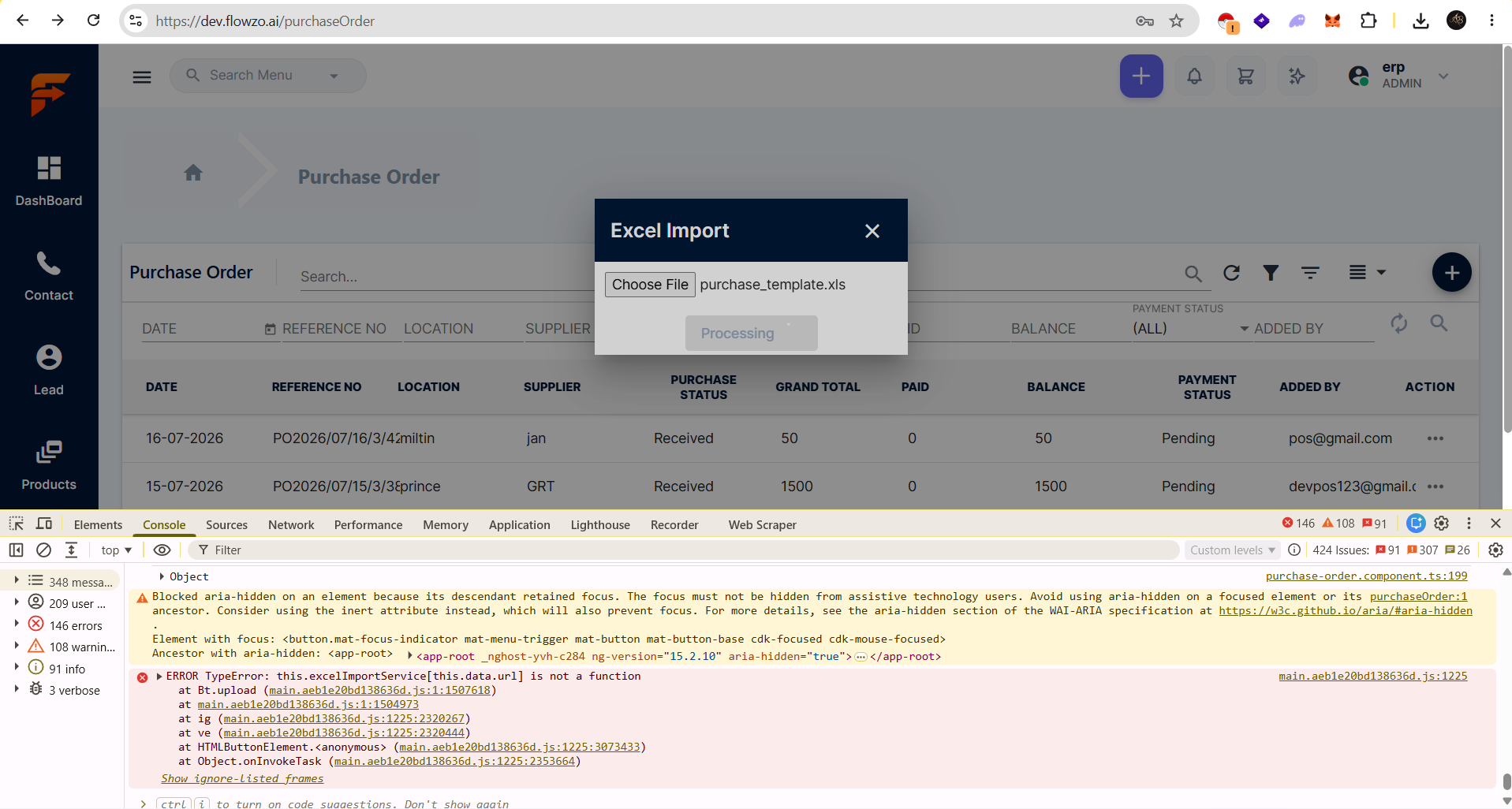
Import stuck in Processing state
Excel file not uploaded
No success or error message shown in UI
Console Error:
ERROR TypeError: this.excelImportService[this.data.url] is not a function
Expected Behavior:
Excel file should upload successfully
Data should be imported into Purchase Order
Proper success message should be shown
If error, proper validation/error message should display
Actual Issue:
File upload initiated
Stuck in processing
Console shows function error
Files
DD Updated by dharani dharani 2 days ago
- Status changed from New to In Progress
- Assignee changed from santhosh DT to dharani dharani
DD Updated by dharani dharani 1 day ago
- Status changed from In Progress to Resolved